Authentication and authorization
Authentication flow
A typical authentication flow consists of four steps:
- Token generation - Sign user data into a token using
SignRaworSignServerResponse. - Token transport - Have the client send the token in the chosen header or cookie. Choose storage and CSRF protection for your client; they are not configured by this interface.
- Token validation - Verify the token when the client makes a request.
- Authorization - Check whether the authenticated user has permission to access the requested resource.
Example authentication flow
The persistence functions in this example (validateUserCredentials and getUserProfile) belong to your application. The profile route verifies a token; add a validator for payload shape and resource permissions. For production cookies, also decide Secure, SameSite, expiry, and CSRF policy for your deployment.
import { SignRaw, Authentication } from "@antelopejs/interface-auth";
import {
  Controller,
  Post,
  Get,
  JSONBody,
  HTTPResult,
} from "@antelopejs/interface-api";

class UserController extends Controller("/users") {
  @Post("login")
  async login(@JSONBody() credentials: { email: string; password: string }) {
    // Validate credentials against your data store
    const user = await validateUserCredentials(credentials);

    // Step 1: Generate a token
    const token = await SignRaw(
      { userId: user.id, role: user.role },
      { expiresIn: "1h" },
    );

    // Step 2: Return token to the client
    const result = new HTTPResult(200, {
      success: true,
      user: { id: user.id, role: user.role },
    });

    result.addHeader(
      "Set-Cookie",
      `ANTELOPEJS_AUTH=${token}; HttpOnly; Secure; SameSite=Lax; Path=/`,
    );

    return result;
  }

  @Get("profile")
  async getProfile(
    @Authentication() userData: { userId: number; role: string },
  ) {
    // Step 3: Token is verified; resource authorization is application policy
    // If the token is invalid, an error is thrown before this code runs
    return { user: await getUserProfile(userData.userId) };
  }
}
This cookie example requires HTTPS. SameSite=Lax is a starting policy for same-site browser use, not a substitute for deciding CSRF protection or cross-site requirements. The helpers named above are application code, not a complete login implementation.
Authentication sources
An AuthSource function extracts the authentication token from the incoming HTTP request. The default source checks two locations in order:
- Custom header - The
x-antelopejs-authheader - Cookie - The
ANTELOPEJS_AUTHcookie
The header contains the raw token, not Bearer <token>. A present header takes precedence even when it is empty or invalid; authentication does not retry with the cookie after verification fails. The default source does not read Authorization.
Create a custom source
Implement the AuthSource type to extract tokens from a different location.
import { CreateAuthDecorator, AuthSource } from "@antelopejs/interface-auth";
import type { IncomingMessage } from "node:http";

const bearerTokenSource: AuthSource = (req: IncomingMessage) => {
  const header = req.headers.authorization;
  if (header?.startsWith("Bearer ")) {
    return header.slice(7);
  }
  return undefined;
};

const BearerAuth = CreateAuthDecorator({
  source: bearerTokenSource,
});
The AuthSource type signature is:
type AuthSource = (
  req: IncomingMessage,
  res: ServerResponse,
) => string | undefined;
Authentication verifiers
An AuthVerifier function validates the token and extracts its payload. The default verifier uses ValidateRaw, which delegates to the underlying token verification implementation (typically JWT).
Create a custom verifier
import {
  CreateAuthDecorator,
  AuthVerifier,
  ValidateRaw,
} from "@antelopejs/interface-auth";

const userVerifier: AuthVerifier<{ userId: string }> = async (
  data,
  options,
) => {
  const payload = await ValidateRaw<unknown>(data, options);
  if (
    typeof payload !== "object" ||
    payload === null ||
    !("userId" in payload) ||
    typeof payload.userId !== "string"
  ) {
    throw new Error("Invalid user payload");
  }
  return { userId: payload.userId };
};

const UserAuth = CreateAuthDecorator({
  authenticator: userVerifier,
});
A verifier must establish trust in the token before returning its payload. Decoding Base64 or parsing JSON alone does not authenticate a request. The generic argument to ValidateRaw<T> describes the expected result for TypeScript; it does not validate the payload's shape.
The AuthVerifier type signature is:
type AuthVerifier<T = unknown> = (
  data?: string,
  options?: VerifyOptions,
) => Promise<T> | T;
Authentication validators
An AuthValidator function performs additional checks on the verified data. Validators run after the verifier and can transform the result or throw an error to reject the request.
import { CreateAuthDecorator, AuthValidator } from "@antelopejs/interface-auth";

interface UserPayload {
  userId: number;
  role: string;
}

const adminValidator: AuthValidator<UserPayload, UserPayload> = (userData) => {
  if (!userData || userData.role !== "admin") {
    throw new Error("Admin access required");
  }
  return userData;
};

const AdminOnly = CreateAuthDecorator({
  validator: adminValidator,
});
The AuthValidator type signature is:
type AuthValidator<T = unknown, R = unknown> = (data: T) => Promise<R> | R;
Authentication pipeline
The complete authentication pipeline processes the request through three stages:
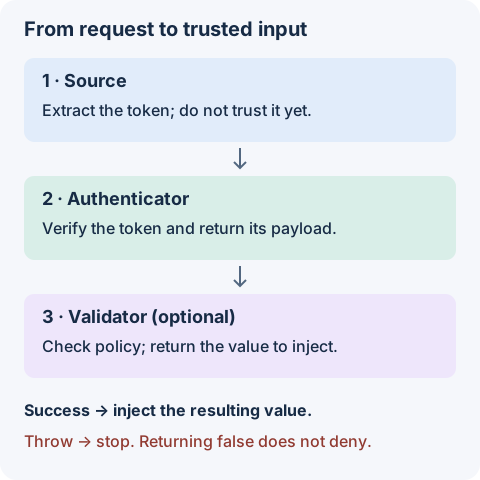
Omitted source and authenticator callbacks use the defaults. There is no default policy validator: without one, the verified payload is injected unchanged.
| Stage | Input | Output | Failure boundary |
|---|---|---|---|
source | Request and response | Token or undefined | Missing input still reaches the authenticator. |
authenticator | Token and verification options | Verified payload | A thrown error or rejected promise stops processing. |
validator | Verified payload | Value to inject | Throw to deny access; a falsy return value is not a rejection. |
A validator passed to a decorator invocation replaces the configured validator; it does not run after it as an extra check. Keep shared policy in a function you explicitly call when composing validators.