Data Models
BasicDataModel
The BasicDataModel function creates a model class for a specific table. It wraps the underlying AQL table with methods that automatically apply modifier transformations.
import { BasicDataModel } from "@antelopejs/interface-database-decorators";
import { User } from "./user.table";

const UserModel = BasicDataModel(User, "users");
Parameters
| Parameter | Type | Description |
|---|---|---|
dataType | Constructible<T> | The Table class representing your table |
tableName | string | The table name in the database (optional if @RegisterTable is used) |
When the table class has been decorated with @RegisterTable, the tableName parameter can be omitted.
Instantiate a Model
A model instance requires a SchemaInstance from the database interface:
import { Schema } from "@antelopejs/interface-database";

const schema = Schema.get("myapp")!;
const db = schema.instance();

const userModel = new UserModel(db);
CRUD Operations
For a model created with BasicDataModel(User), the return values are:
| Method | Declared return | Meaning |
|---|---|---|
get(id) | PromiseLike<User | undefined> | The converted row, or undefined when the provider returns no row. |
getBy(index, ...keys) / getAll() | PromiseLike<User[]> | Converted rows, not an AQL query to chain. |
insert(data, options?) | Promise<string[]> | Inserted document IDs. |
update(...) | Promise<number> | Number of modified documents. |
delete(id) | Promise<number> | Number of deleted documents. |
Use model.table to compose AQL queries before execution. The static fromDatabase() conversion can return undefined; toDatabase() returns a plain Record<string, any>, not a saved record or a write result.
Read
// Get by primary key
const user = await userModel.get("user-123");

// Get by secondary index
const admins = await userModel.getBy("role", "admin");

// Get all documents
const allUsers = await userModel.getAll();
Create
// Insert a single document
const ids = await userModel.insert({
  email: "[email protected]",
  name: "Alice",
});

// Insert multiple documents
const batchIds = await userModel.insert([
  { email: "[email protected]", name: "Bob" },
  { email: "[email protected]", name: "Carol" },
]);
Update
// Update by ID
await userModel.update("user-123", { name: "Updated Name" });

// Update by including the primary key in the object
await userModel.update({ _id: "user-123", name: "Updated Name" });
Important: When calling
updatewithout a separate ID argument, the object must include the primary key field.
Delete
await userModel.delete("user-123");
Data Conversion
Data models include static methods for converting between different data representations:
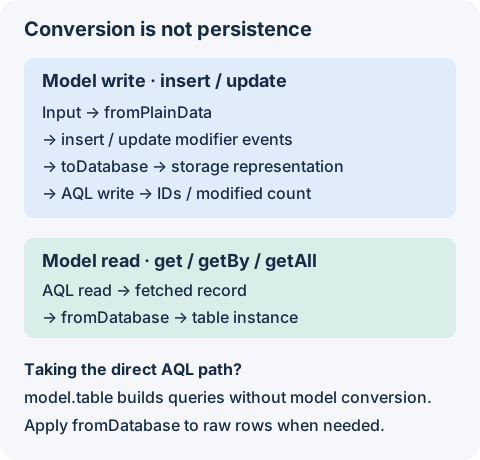
| Starting value | Conversion | Result | Persists data? |
|---|---|---|---|
| Plain application input | fromPlainData | Table instance with input modifier events applied | No |
| Raw database record | fromDatabase | Table instance with read modifier events applied | No |
| Table instance | toDatabase | Plain storage representation | No |
Use insert or update to perform a write; conversion alone does not save anything. Reads through get, getBy, and getAll apply fromDatabase for you. A custom query through model.table returns AQL results, so apply conversion explicitly when you need model instances.
fromPlainData(obj)
Convert a plain JavaScript object into a Table class instance. Modifier transformations (like encryption and hashing) are applied during this conversion.
const user = UserModel.fromPlainData({
  _id: "user-123",
  email: "[email protected]",
  name: "John",
});
fromDatabase(obj)
Convert a raw database record into a Table class instance. This attaches the class prototype and triggers the fromDatabase modifier event.
const user = UserModel.fromDatabase(rawDbRecord);
toDatabase(obj)
Convert a Table class instance into a plain object suitable for database storage. Modifier events like toDatabase are triggered.
const dbReady = UserModel.toDatabase(userInstance);
Validation
Model.validate(obj) runs every io-ts codec attached via @Field against the matching property of obj. String-token fields and properties without @Field are skipped.
const result = UserModel.validate({ name: "Alice", age: 30 });
if (!result.ok) {
  console.error(result.errors); // [{ field: "age", message: "not number" }, ...]
}
Pass { validate: true } to insert or update to gate the write on validation. On failure the call throws an Error whose errors property holds the per-field details; on success the original object passes through unchanged.
await userModel.insert({ name: "Alice", age: 30 }, { validate: true });
await userModel.update("user-123", { name: "Bob" }, { validate: true });
insert validates every annotated codec field. update is partial: only fields present on the patch object are checked, so omitting fields you don't intend to modify is fine. Use Model.validate(obj, { partial: true }) for the same patch semantics outside of update.
Extend BasicDataModel
Extend the generated model class to add custom query methods:
The register method below checks for an existing email to provide early feedback. It does not guarantee uniqueness under concurrent writes; enforce that constraint in the database where supported and handle conflicts.
const UserModelBase = BasicDataModel(User, "users");

class CustomUserModel extends UserModelBase {
  async findActive() {
    return this.table
      .filter((u) => u.key("status").eq("active"))
      .then((rows) => rows.map(CustomUserModel.fromDatabase) as User[]);
  }

  async register(email: string, name: string) {
    const existing = await this.getBy("email", email);
    if (existing.length > 0) {
      throw new Error("Email already in use");
    }
    return this.insert({ email, name, status: "active" });
  }
}
GetModel
The GetModel function retrieves or creates a cached model instance for a given schema:
import { GetModel } from "@antelopejs/interface-database-decorators";

const userModel = GetModel(UserModel, "instance-id");
Model instances are cached by class and instance ID, so repeated calls with the same arguments return the same instance. A model built by BasicDataModel uses the schema its table class was bound to by RegisterSchema, so it stays on the declaring module's database even when another module calls GetModel; an unbound table class throws. A custom model class without a tableClass is resolved from its schemaName with Schema.get.
Modifier Integration
Data models automatically apply all modifier transformations:
- On insert -
fromPlainDataconversion is applied, theinsertevent fires, and the result is converted withtoDatabasebefore writing. - On update - The same conversion pipeline applies with the
updateevent. - On read - Results from
get,getBy, andgetAllare converted withfromDatabase.
This means encrypted fields are encrypted before storage and decrypted on retrieval, hashed fields are hashed on write, and localized fields follow their configured locale behavior -- all transparently.
Table Modifiers
Table modifiers transform field values as they are stored in and retrieved from the database. They enable transparent encryption, hashing, localization, and custom data transformations. Add modifiers to a table class using the Table.with() method.
Parameter Decoration
The Database Decorators package provides the Model decorator for injecting data model instances into API controller methods. This decorator integrates with the @antelopejs/interface-api package's parameter provider system.