Query RethinkDB through a managed connection
Overview
Build a native RethinkDB query with r, then execute it through RunQuery on a provider-managed connection. The interface re-exports the rethinkdb-ts query builder; it does not introduce a second query language.
Build first, execute second
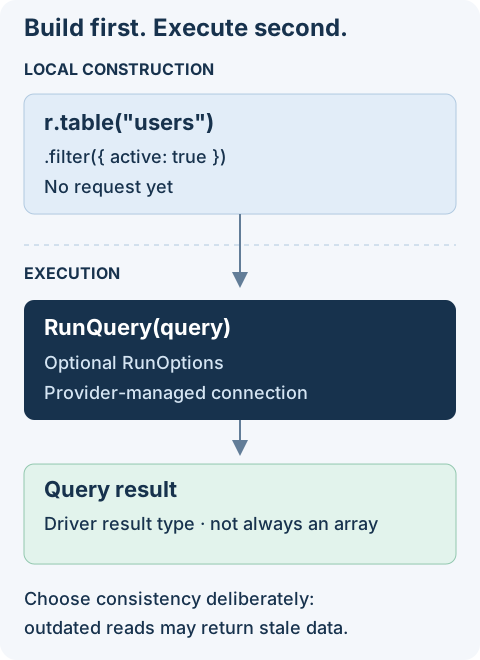
Choose the operation you need:
- Create, retrieve, update, or delete documents.
- Set read and durability options for one execution.
- Join or aggregate records with native query expressions.
- Look up the two exports:
randRunQuery.
Configure an implementing module and a reachable RethinkDB database before executing queries. The examples assume a users table in the configured default database. The join example also needs a posts table with an authorId secondary index. Installing this interface creates neither tables nor indexes.
Getting Started
Install the package in your project:
pnpm add @antelopejs/interface-rethinkdb
Read one record first
Run this in an AntelopeJS module bound to a RethinkDB provider. Pass an existing ID from the users table; a missing ID returns null.
import { RunQuery, r } from "@antelopejs/interface-rethinkdb";

export async function readUser(id: string) {
  const user = await RunQuery(r.table("users").get(id));
  if (user === null) return "User not found";
  return user;
}
Building the query does not read the record; RunQuery executes it. Native queries do not apply AQL model modifiers or Data API field permissions, so do not expose the entire record as an HTTP response without selecting public fields.
r (Query Builder)
The r object is the RethinkDB query builder, re-exported directly from the rethinkdb-ts package. Use it to construct queries that you then execute with RunQuery.
import { r } from "@antelopejs/interface-rethinkdb";

// Build a query (does not execute it)
const query = r.table("users").filter({ active: true });
RunQuery
The RunQuery function executes a RethinkDB query against the managed connection. It accepts a query built with r and optional run options.
import { RunQuery, r } from "@antelopejs/interface-rethinkdb";

const result = await RunQuery(r.table("users").get("123"));
| Parameter | Type | Description |
|---|---|---|
query | RQuery | A RethinkDB query built using the r query builder |
options | RunOptions | Optional execution settings (e.g., readMode, durability) |
The function returns the result type that matches the query's run() return type. It delegates execution to the provider rather than opening a connection itself. Do not assume every query returns an array: consume results according to the driver's query type.
CRUD Operations
Insert documents
import { RunQuery, r } from "@antelopejs/interface-rethinkdb";

async function createUser(name: string, email: string) {
  const result = await RunQuery(
    r.table("users").insert({ name, email, createdAt: r.now() }),
  );
  const id = result.generated_keys?.[0];
  if (result.errors || !id) {
    throw new Error(
      result.first_error ?? "Insert did not return a generated key",
    );
  }
  return id;
}
Retrieve documents
import { RunQuery, r } from "@antelopejs/interface-rethinkdb";

async function getUser(id: string) {
  return RunQuery(r.table("users").get(id));
}

async function getActiveUsers() {
  return RunQuery(r.table("users").filter({ active: true }));
}
Update documents
import { RunQuery, r } from "@antelopejs/interface-rethinkdb";

async function updateEmail(userId: string, newEmail: string) {
  const result = await RunQuery(
    r.table("users").get(userId).update({ email: newEmail }),
  );
  if (result.errors) throw new Error(result.first_error ?? "Update failed");
  return {
    updated: result.replaced,
    unchanged: result.unchanged,
    skipped: result.skipped,
  };
}
Check the write result even when the promise resolves: RethinkDB can report write errors in errors and first_error. unchanged means the value already matched; skipped includes a missing record. Neither is the same as a modified record.
Delete documents
import { RunQuery, r } from "@antelopejs/interface-rethinkdb";

async function deleteUser(userId: string) {
  const result = await RunQuery(r.table("users").get(userId).delete());
  if (result.errors) throw new Error(result.first_error ?? "Delete failed");
  return result.deleted;
}
The returned count is the number of deleted records. Also handle rejected promises; inspecting errors does not replace exception handling.
Query Options
Pass RunOptions as the second argument to control query execution behavior. readMode: "outdated" permits stale reads; choose it only when the application can tolerate them, not for decisions that require current data.
import { RunQuery, r } from "@antelopejs/interface-rethinkdb";

// Use outdated reads for better performance when strong consistency is not needed
const users = await RunQuery(r.table("users").filter({ role: "admin" }), {
  readMode: "outdated",
});
Advanced Queries
Joins
import { RunQuery, r } from "@antelopejs/interface-rethinkdb";

async function getUsersWithPosts() {
  return RunQuery(
    r.table("users").eqJoin("id", r.table("posts"), { index: "authorId" }),
  );
}
Aggregations
import { RunQuery, r } from "@antelopejs/interface-rethinkdb";

async function countUsersByRole() {
  return RunQuery(r.table("users").group("role").count());
}
For the complete query builder API, refer to the RethinkDB documentation and the rethinkdb-ts package.