Query MongoDB with the shared client
Overview
Use the shared MongoDB connection without creating a client in every module. GetClient() returns the native MongoClient; queries, cursors, indexes, and transactions use the MongoDB driver's API.
Choose a database task
- Read and write documents for application records.
- Aggregate records for grouped counts and reports.
- Create indexes for query performance and uniqueness constraints.
- Understand client ownership before adding connection or shutdown code.
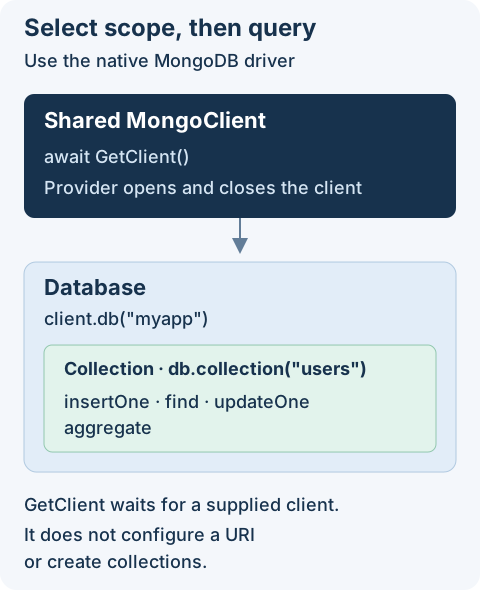
The interface does not configure a URI, start MongoDB, or define a data model. Configure an implementing module and a reachable MongoDB deployment before running the examples. The examples use the myapp database and users collection; use disposable data when trying writes.
Getting Started
Install the package in your project:
pnpm add @antelopejs/interface-mongodb
Read a small result first
Run this in an AntelopeJS module bound to a MongoDB provider. It selects at most ten documents and only returns their IDs and names; an empty array means no documents matched, not necessarily a connection failure.
import { GetClient } from "@antelopejs/interface-mongodb";

export async function listUserNames() {
  const client = await GetClient();
  return client
    .db("myapp")
    .collection("users")
    .find({}, { projection: { name: 1 } })
    .limit(10)
    .toArray();
}
find() builds a cursor; toArray() consumes it. Keep a limit for exploratory reads rather than loading an entire collection into memory. Native MongoDB queries do not apply AQL model modifiers or Data API field permissions.
GetClient
The GetClient function retrieves the initialized MongoDB client instance. This is the main entry point for all MongoDB operations.
import { GetClient } from "@antelopejs/interface-mongodb";

async function example() {
  const client = await GetClient();
  // The client is a standard mongodb MongoClient instance
}
The function returns a Promise<MongoClient> resolved by the implementing module. It waits if no client has been supplied; it is not a connectivity probe or a connection timeout.
Treat this client as shared: let the provider own connection setup and shutdown. Do not call close() after each query. Select the database explicitly with client.db("myapp"), and use the driver's error handling and timeout options for operations.
CRUD Operations
Use the client to access databases and collections for standard create, read, update, and delete operations.
Insert documents
import { GetClient } from "@antelopejs/interface-mongodb";

async function createUser(name: string, email: string) {
  const client = await GetClient();
  const db = client.db("myapp");
  const collection = db.collection("users");

  const result = await collection.insertOne({
    name,
    email,
    createdAt: new Date(),
  });
  return result.insertedId;
}
Find documents
import { GetClient } from "@antelopejs/interface-mongodb";

async function findUsersByRole(role: string) {
  const client = await GetClient();
  const db = client.db("myapp");
  const users = db.collection("users");

  return users.find({ role }).toArray();
}
Update documents
import { GetClient } from "@antelopejs/interface-mongodb";

async function updateEmail(userId: string, newEmail: string) {
  const client = await GetClient();
  const db = client.db("myapp");
  const users = db.collection("users");

  const { ObjectId } = await import("mongodb");
  const result = await users.updateOne(
    { _id: new ObjectId(userId) },
    { $set: { email: newEmail, updatedAt: new Date() } },
  );
  return { matched: result.matchedCount, modified: result.modifiedCount };
}
For acknowledged writes, matchedCount tells you whether the record existed; modifiedCount alone does not. Validate external IDs before constructing ObjectId; malformed values throw. This example uses MongoDB-generated ObjectIds, not string _id values.
Delete documents
import { GetClient } from "@antelopejs/interface-mongodb";

async function deleteUser(userId: string) {
  const client = await GetClient();
  const db = client.db("myapp");
  const users = db.collection("users");

  const { ObjectId } = await import("mongodb");
  const result = await users.deleteOne({ _id: new ObjectId(userId) });
  return result.deletedCount;
}
For acknowledged writes, a delete count of zero means no document was deleted. Propagate or handle driver errors rather than reporting success merely because the function completed.
Aggregation Pipelines
The MongoDB client supports aggregation pipelines for advanced data processing.
import { GetClient } from "@antelopejs/interface-mongodb";

async function getUserCountsByRole() {
  const client = await GetClient();
  const db = client.db("myapp");
  const users = db.collection("users");

  return users
    .aggregate([
      { $group: { _id: "$role", count: { $sum: 1 } } },
      { $sort: { count: -1 } },
    ])
    .toArray();
}
Indexes
Create indexes during an intentional setup or migration step, not on each request. A unique index on email rejects duplicates and can fail to build if existing data already contains them.
import { GetClient } from "@antelopejs/interface-mongodb";

async function setupIndexes() {
  const client = await GetClient();
  const db = client.db("myapp");
  const users = db.collection("users");

  await users.createIndex({ email: 1 }, { unique: true });
  await users.createIndex({ role: 1, createdAt: -1 });
}
For the complete list of available operations, refer to the MongoDB Node.js Driver documentation.