Interface Stripe Documentation
Overview
Create payment intents and react to their status through @antelopejs/interface-stripe. The package uses the official Stripe Node.js SDK; an implementing module supplies the configured client and payment-change events.
Choose a payment task
| Your task | Start here |
|---|---|
| Start a browser checkout | Complete payment flow |
| Create an intent with your order ID | InitializePayment |
| Reconcile success or cancellation | WaitForPayment |
| React to status updates | Event monitoring |
| Use an existing chargeable Source | CompletePayment |
| Call another Stripe API | GetClient |
Configure a Stripe implementation, test credentials, and verified webhook delivery before using these examples. This page does not process payments. Keep secrets on the server and use Stripe test mode when trying a flow.
Installation
Install the interface as a dependency:
npm install @antelopejs/interface-stripe
Exports
The interface exposes the following public API:
| Export | Type | Description |
|---|---|---|
GetClient | Function | Returns the initialized Stripe client instance. |
InitializePayment | Function | Creates a new payment intent and associates a custom payload ID. |
WaitForPayment | Function | Waits for a payment intent to reach a terminal state. |
CompletePayment | Function | Completes a payment using a chargeable Stripe source. |
WatchAllPayments | Function | Registers a callback for all payment intent changes. |
WatchPayment | Function | Registers a callback for a specific payment intent's changes. |
IntentChangeContext | Interface | Context metadata attached to payment intent change events. |
Key Concepts
Payment Intents
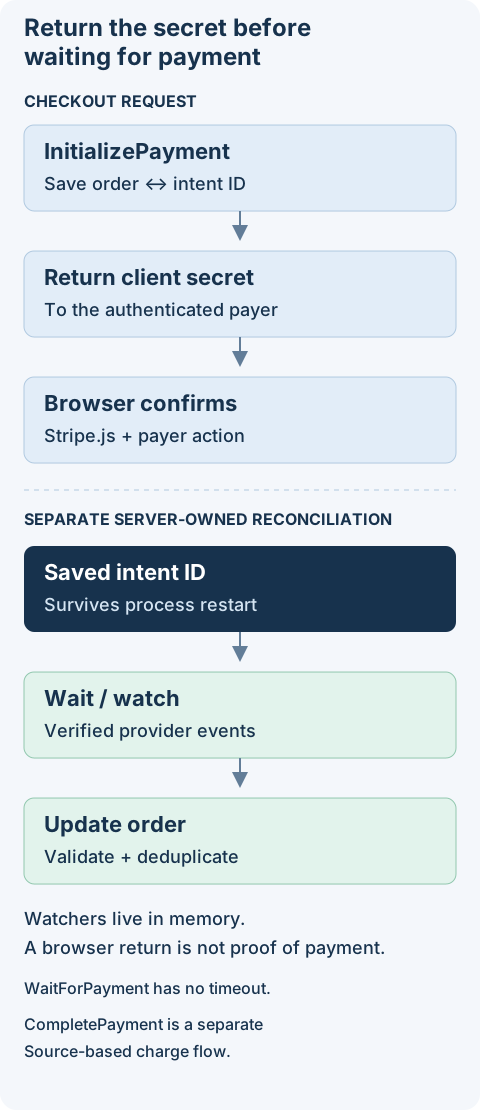
Every payment flows through the Stripe PaymentIntent object. The InitializePayment function creates a payment intent and stores a custom identifier in its metadata.payload field. This identifier links the Stripe payment intent back to your application-level entity (such as an order ID).
Event Monitoring
Payment intent status changes propagate through an internal event system. IntentChangeContext.local distinguishes events from the current instance from forwarded cluster events. Filtering forwarded events does not deduplicate webhook redelivery; make order updates idempotent and persist enough state to reconcile after a restart.
Terminal States
A payment intent reaches a terminal state when its status becomes either succeeded or canceled. The WaitForPayment function resolves on success and rejects on cancellation. Watcher callbacks registered with WatchPayment are automatically cleaned up once the intent reaches a terminal state.
Documentation Sections
- Payment Processing - Create, complete, and await payment intents.
- Event Monitoring - Watch payment intent changes and react to status updates.