Interface Redis Documentation
Overview
Cache values, publish notifications, and run Redis commands through a shared ioredis client. GetClient() is the interface's only application entry point; command behavior comes from ioredis and Redis.
Choose a Redis task
| Task | Guide | Watch for |
|---|---|---|
| Cache data | Key-value operations | TTLs use seconds; a missing key returns null. |
| Receive notifications | Pub/sub messaging | Use and close a dedicated subscriber. |
| Work with lists and sets | Additional operations | Commands change shared server state. |
| Execute commands together | Transactions | Atomic execution is not application validation. |
Configure a Redis implementation and reachable server first. Installing the interface does not create a connection. Use a disposable database or isolated key prefix for these examples.
Getting Started
Install the package in your project:
npm install @antelopejs/interface-redis
GetClient
The GetClient function retrieves the initialized Redis client instance. This is the main entry point for all Redis operations.
import { GetClient } from "@antelopejs/interface-redis";

async function cacheGreeting() {
  const client = await GetClient();
  await client.set("docs:greeting", "Hello from Redis", "EX", 60);
  const greeting = await client.get("docs:greeting");
  console.log(greeting); // "Hello from Redis", or null if the key expired.
}
Call cacheGreeting() from your initialized application. The EX value is a
lifetime in seconds, not a timestamp. This example expires its key after one minute.
The function returns a Promise<Redis> resolved by the implementing module. Without a supplied client it waits; the interface does not add a connection timeout. Keep the shared connection open for other consumers and leave its lifecycle to the provider.
Key-Value Operations
Redis stores strings. Serialize objects when writing them and parse the returned
string when reading; a missing or expired key returns null.
Store and retrieve values
import { GetClient } from "@antelopejs/interface-redis";

async function storeUserData(userId: string, data: object) {
  const client = await GetClient();

  // Store a JSON value
  await client.set(`user:${userId}`, JSON.stringify(data));

  // Retrieve it later
  const raw = await client.get(`user:${userId}`);
  if (raw) {
    const userData = JSON.parse(raw);
    console.log(userData);
  }
}
Use expiration for temporary data
import { GetClient } from "@antelopejs/interface-redis";

async function cacheResponse(key: string, data: string, ttlSeconds: number) {
  const client = await GetClient();

  // Store with an expiration time
  await client.set(key, data, "EX", ttlSeconds);
}

async function getCache(key: string): Promise<string | null> {
  const client = await GetClient();
  return client.get(key);
}
Work with hashes
import { GetClient } from "@antelopejs/interface-redis";

async function manageUserProfile(userId: string) {
  const client = await GetClient();

  // Store multiple fields in a hash
  await client.hset(`profile:${userId}`, {
    name: "Alice",
    email: "[email protected]",
    role: "admin",
  });

  // Retrieve a single field
  const name = await client.hget(`profile:${userId}`, "name");

  // Retrieve all fields
  const profile = await client.hgetall(`profile:${userId}`);
  console.log(profile); // { name: "Alice", email: "[email protected]", role: "admin" }
}
Pub/Sub Messaging
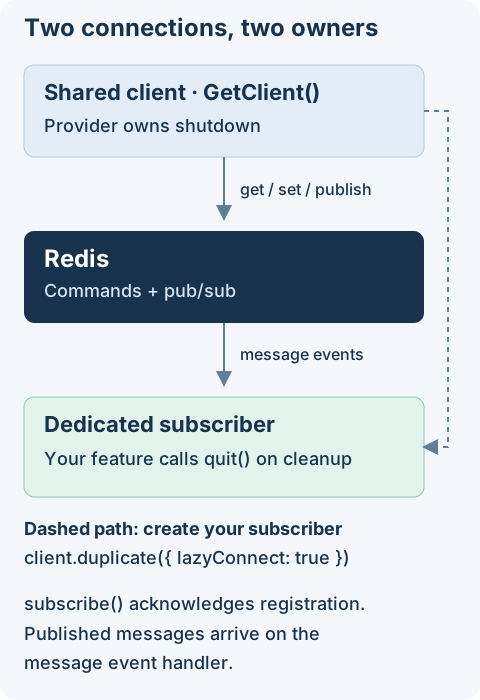
Redis pub/sub enables real-time messaging between different parts of your application. Use duplicate() to create a dedicated subscriber connection, since a subscribed client cannot issue other commands.
Subscribe to a channel
import { GetClient } from "@antelopejs/interface-redis";

async function setupNotifications() {
  const client = await GetClient();
  const subscriber = client.duplicate({ lazyConnect: true });

  subscriber.on("message", (channel, message) => {
    console.log(`[${channel}] ${message}`);
  });
  await subscriber.connect();
  await subscriber.subscribe("notifications");
  return subscriber;
}
subscribe() resolves when Redis acknowledges the subscription. Its optional callback receives acknowledgement or error information, not published messages.
- Register the
messagehandler before subscribing. - Retain the returned subscriber while the feature is active.
- Call
await subscriber.quit()during cleanup, notquit()on the shared client.
Pub/sub is a notification channel, not durable task storage. Disconnected subscribers do not receive a replay of missed messages.
Publish messages
import { GetClient } from "@antelopejs/interface-redis";

async function sendNotification(message: string) {
  const client = await GetClient();
  await client.publish("notifications", message);
}
Pattern-based subscriptions
import { GetClient } from "@antelopejs/interface-redis";

async function subscribeToUserEvents() {
  const client = await GetClient();
  const subscriber = client.duplicate({ lazyConnect: true });

  subscriber.on("pmessage", (pattern, channel, message) => {
    console.log(
      `Pattern: ${pattern}, Channel: ${channel}, Message: ${message}`,
    );
  });
  await subscriber.connect();
  // Subscribe to all channels matching the pattern
  await subscriber.psubscribe("user:*:events");
  return subscriber; // Quit this dedicated connection during cleanup.
}
Additional Operations
The ioredis client supports the full range of Redis commands. Here are a few common patterns.
Lists
import { GetClient } from "@antelopejs/interface-redis";

async function manageQueue() {
  const client = await GetClient();

  // Push items to a list
  await client.lpush("task-queue", "task-1", "task-2");

  // Pop an item from the list
  const task = await client.rpop("task-queue");
  console.log(task); // "task-1"
}
Sets
import { GetClient } from "@antelopejs/interface-redis";

async function trackUniqueVisitors(pageId: string, visitorId: string) {
  const client = await GetClient();

  await client.sadd(`visitors:${pageId}`, visitorId);

  const count = await client.scard(`visitors:${pageId}`);
  console.log(`Unique visitors: ${count}`);
}
Transactions
multi().exec() executes the queued commands together, but does not check balances, validate a positive amount, or roll back successful commands when another command errors. The example demonstrates command grouping, not a complete financial transfer. Inspect each result and implement business preconditions separately.
import { GetClient } from "@antelopejs/interface-redis";

async function transferCredits(
  fromUser: string,
  toUser: string,
  amount: number,
) {
  const client = await GetClient();

  // Execute multiple commands atomically
  const results = await client
    .multi()
    .decrby(`credits:${fromUser}`, amount)
    .incrby(`credits:${toUser}`, amount)
    .exec();

  if (results === null) {
    throw new Error("Transaction aborted");
  }
  for (const [error] of results) {
    if (error) throw error;
  }
  console.log("Redis commands completed; business validation is separate");
}
For the complete list of available commands, refer to the ioredis documentation and the official Redis command reference.