Introduction
Choose your sending path
| Your task | Start here |
|---|---|
| Send a welcome email or receipt | Send a message |
| Personalize provider-hosted or inline content | Template emails |
| Send several messages and inspect partial failures | Batch sending |
| Include a document or inline image | Attachments |
| Keep optional features portable | Provider capabilities |
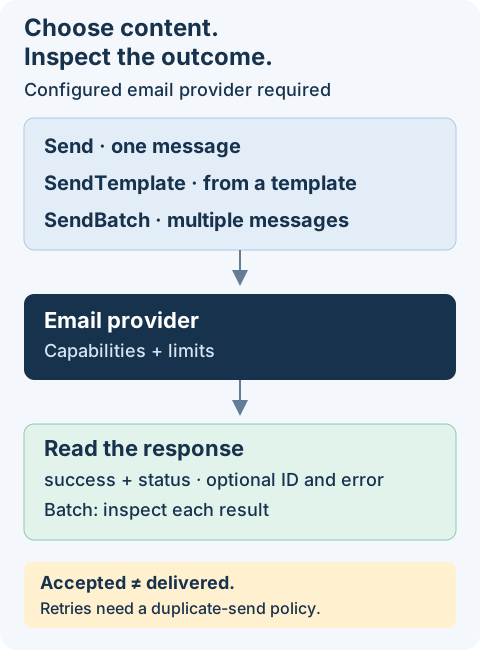
Before sending: configure an implementation with credentials and an authorized sender. Installing this contract alone does not connect an email service. Examples use placeholder recipients and do not send mail from this documentation.
Core Concepts
The interface separates email operations into four functions:
| Function | Purpose |
|---|---|
Send | Send a single email with full control over content and options |
SendBatch | Send multiple emails in a single operation |
SendTemplate | Send an email rendered from a template |
GetCapabilities | Query the provider's supported features and limits |
The sending functions return typed delivery responses. GetCapabilities returns feature flags and limits instead. A successful send means the provider accepted the request; inspect status rather than treating acceptance as confirmed delivery.
Installation
npm install @antelopejs/interface-email
Email Address Types
Recipients, senders, and reply-to addresses all accept the EmailAddress type. This type supports two formats: a plain string or an object with an optional display name.
String format
Pass an email address directly as a string:
import type { EmailAddress } from "@antelopejs/interface-email";

const to: EmailAddress = "[email protected]";
Object format with EmailAddressObject
Use the object format to include a display name alongside the address:
import { EmailAddressObject } from "@antelopejs/interface-email";

const sender: EmailAddressObject = {
  email: "[email protected]",
  name: "MyApp Support",
};
The EmailAddress union type
The EmailAddress type is a union of both formats. All address fields in the interface accept either form:
import { EmailAddress } from "@antelopejs/interface-email";

// Both are valid EmailAddress values
const simple: EmailAddress = "[email protected]";
const detailed: EmailAddress = { email: "[email protected]", name: "Hello" };
Fields like to, cc, and bcc also accept arrays of EmailAddress, so you can mix formats freely:
import { Send } from "@antelopejs/interface-email";

await Send({
  to: ["[email protected]", { email: "[email protected]", name: "Bob" }],
  subject: "Team Update",
  text: "Here is the latest update.",
});
Provider Capabilities
Not all email providers support every feature. The GetCapabilities function returns a ProviderCapabilities object describing the provider's name, limits, and supported features.
import { GetCapabilities } from "@antelopejs/interface-email";

const capabilities = await GetCapabilities();

console.log(capabilities.name); // e.g., "sendgrid"
console.log(capabilities.features.batch); // true or false
console.log(capabilities.features.scheduling); // true or false
console.log(capabilities.maxRecipients); // e.g., 1000
The ProviderFeatures object includes the following flags:
| Feature | Description |
|---|---|
batch | Supports sending multiple emails in one request |
templates | Supports provider-hosted templates |
scheduling | Supports delayed email delivery |
openTracking | Tracks when recipients open emails |
clickTracking | Tracks when recipients click links |
inlineAttachments | Supports inline/embedded images |
tags | Supports email tagging for analytics |
metadata | Supports custom metadata on emails |
priority | Supports email priority levels |
Check capabilities before using optional features to ensure your code works across providers:
import {
  GetCapabilities,
  Send,
  type EmailParams,
} from "@antelopejs/interface-email";

const caps = await GetCapabilities();

const params: EmailParams = {
  to: "[email protected]",
  subject: "Hello",
  html: "<p>Welcome!</p>",
};

if (caps.features.scheduling) {
  params.schedule = { sendAt: new Date(Date.now() + 60 * 60 * 1000) };
}

await Send(params);
Capability limits are optional: maxRecipients, maxBatchSize, maxAttachmentSize, and maxEmailSize may be absent. Size limits are in bytes. An absent limit is not a promise of unlimited capacity; check your provider configuration. version is optional provider metadata.
Next Steps
- Sending Emails -- Learn about all email parameters, templates, batch sending, and delivery responses.
- Attachments -- Attach files using buffers, base64, file paths, or URLs.
Parameter Decoration
The Database Decorators package provides the Model decorator for injecting data model instances into API controller methods. This decorator integrates with the @antelopejs/interface-api package's parameter provider system.
Sending Emails
The interface provides three sending functions: Send for single emails, SendTemplate for template-based emails, and SendBatch for multiple emails in one operation.