Introduction
Choose a file workflow
| Your task | Start here |
|---|---|
| Upload immediately to a fresh key | Upload flow |
| Keep abandoned form uploads temporary | Staging and promotion |
| Authorize a download | Download flow and visibility |
| Inspect or remove an object | Metadata and deletion |
| Implement a storage backend | Provider responsibilities and conformance tests |
Before uploading: configure a storage implementation, credentials, browser CORS, and your application's authorization routes. These examples describe real API calls, not an embedded upload demo. Use disposable files when trying them.
Core Concepts
The interface centers on presigned URLs for file transfers. Instead of routing file data through your application server, clients upload and download directly to and from the storage provider using time-limited, signed URLs.
| Function | Purpose |
|---|---|
CreateUploadUrl | Generate a presigned URL for direct file uploads |
CreateReadUrl | Generate a URL to read or download a file |
DeleteFile | Remove a file from storage |
FileExists | Check whether a file exists |
GetFileMetadata | Retrieve metadata for a stored file |
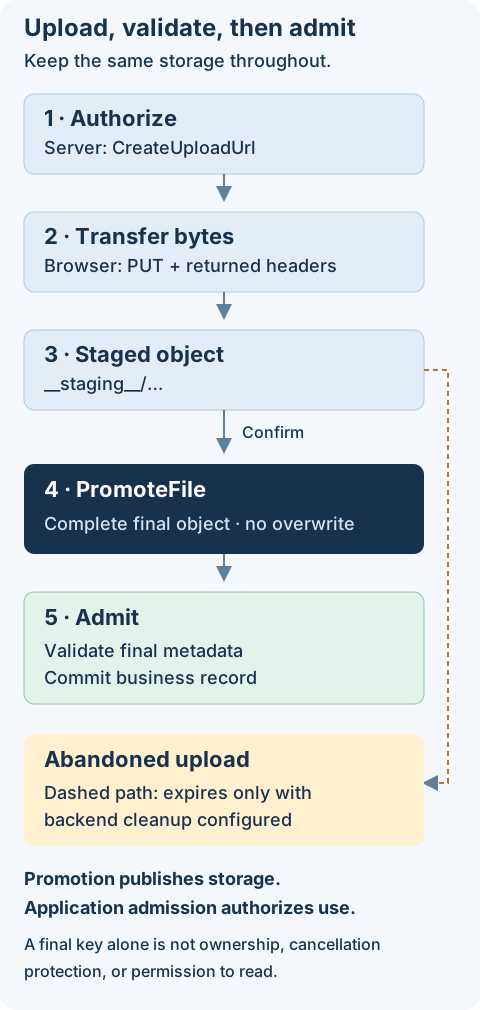
PromoteFile | Move a staged upload out of the staging area to its final key |
MoveFile | Move a stored object from one resource key to another |
Installation
npm install @antelopejs/interface-file-storage
Visibility
The Visibility type controls file access. It accepts two values:
| Value | Description |
|---|---|
"public" | Files are accessible via a direct, permanent URL with no expiration |
"private" | Files require a presigned URL with a limited expiration window |
Visibility defaults to the storage configuration. Set UploadRequest.visibility to
"public" or "private" when one file needs different access. Omitting it keeps
the existing storage-wide behavior. The selected visibility survives staging and
promotion. When calling CreateReadUrl, public files return a URL with no
expiresAt, while private files include an expiration timestamp.
import { CreateReadUrl } from "@antelopejs/interface-file-storage";

// For a public file, the URL has no expiration
const publicFile = await CreateReadUrl("uploads/logo.png");
console.log(publicFile.url); // Direct public URL
console.log(publicFile.expiresAt); // undefined

// For a private file, specify an expiration time in seconds
const privateFile = await CreateReadUrl("documents/contract.pdf", 3600);
console.log(privateFile.url); // Presigned URL
console.log(privateFile.expiresAt); // Timestamp when the URL expires
Error Classes
The interface defines error classes for upload validation, missing files, and conflicting promotion destinations.
UploadValidationError
Thrown when an upload request violates the specified constraints. The code property indicates the specific validation failure:
| Code | Description |
|---|---|
"SIZE_EXCEEDED" | The file size exceeds the maximum allowed size |
"MIMETYPE_NOT_ALLOWED" | The file's MIME type is not in the allowed list |
import {
  CreateUploadUrl,
  UploadValidationError,
} from "@antelopejs/interface-file-storage";

try {
  await CreateUploadUrl(
    { filename: "video.mp4", size: 500_000_000, mimetype: "video/mp4" },
    { maxSize: 10_000_000 },
  );
} catch (error) {
  if (error instanceof UploadValidationError) {
    console.error(`Validation failed [${error.code}]: ${error.message}`);
  }
}
FileNotFoundError
Thrown when an operation targets a file that does not exist in storage. The error message includes the resource key that was not found.
import {
  GetFileMetadata,
  FileNotFoundError,
} from "@antelopejs/interface-file-storage";

try {
  const metadata = await GetFileMetadata("uploads/missing-file.txt");
} catch (error) {
  if (error instanceof FileNotFoundError) {
    console.error(error.message); // "File not found: uploads/missing-file.txt"
  }
}
FileConflictError
Thrown when a promotion destination belongs to another source or its complete
publication cannot be verified. Its code is FILE_CONFLICT, distinct from a
missing file. Providers must not turn an unknown outcome into success; callers
can retry promotion with the same key and storage to reconcile it.
Multi-Bucket Support
Every storage operation accepts an optional storage parameter as its last argument. This identifier selects a specific storage bucket in multi-bucket configurations. When omitted, the default storage is used. The key helpers only transform strings and do not select a bucket.
import { CreateUploadUrl } from "@antelopejs/interface-file-storage";

// Upload to the default storage
await CreateUploadUrl({
  filename: "photo.jpg",
  size: 204800,
  mimetype: "image/jpeg",
});

// Upload to a specific storage bucket
await CreateUploadUrl(
  { filename: "photo.jpg", size: 204800, mimetype: "image/jpeg" },
  undefined,
  "media-bucket",
);
Provider conformance tests
The package publishes its shared Mocha suite from src/tests to dist/tests.
Antelope's ajs module test automatically discovers it for providers declaring
@antelopejs/interface-file-storage in antelopeJs.implements, alongside their
own test.folder suites. Do not import or copy the shared tests into providers.
Configure a disposable default storage supporting explicit public and private uploads, with reachable HTTP upload/read URLs. The suite uses only public interface calls and the returned HTTP headers; it creates unique test keys and deletes them after each test. It covers metadata, visibility, immutable uploads, trusted promotion replay, foreign destinations, missing files, and cleanup. Provider-specific routing, filesystem faults, S3 signatures, and lifecycle rules remain in provider tests.
pnpm test in this interface repository runs its separate forwarding/helper unit
tests. Those mocks verify wrapper behavior, not provider conformance. Validate
the shared suite with each provider's normal module runner before release.
Next Steps
- File Operations -- Detailed guide on uploading, downloading, deleting files, and working with metadata.
Attachments
The interface supports four attachment types, each suited to a different source of file data. All types share a common BaseAttachment structure and are passed through the attachments field of EmailParams.
File Operations
The interface provides functions for uploading files via presigned URLs, generating download URLs, deleting files, checking existence, and retrieving metadata.